Friday, June 30, 2006

Coin Shrinker!


Today's totally rad technology is the amazing coin shrinker. That's right, a machine that can actually shrink a quarter down to the size of a dime.

How do they do it? Simple, they just pass about 1 million amps of electrical current through the coin. To put things in perspective, that is enough power to run a large city. The whole process takes approximately 25 millionths of a second. The coin only shrinks in diameter. It gets thicker, so the actual weight of the coin doesn't change. If this thing were a Master Card commercial it would run something like this:

Coin: 25¢
Electricity Bill: $1,000,000*
Ruining a perfectly good quarter just to impress your physicist friends while you hang out in you mom's basement: priceless

* I'm sure its not that high, but anything lower would lessen the comedic effect.

The salivating coolness factor on this is way up there. I don't even know why. My theory is that is a guy thing. Try asking your wife if you can install one in your basement. You should refrain from using phrases like "high-velocity metal forming", and "bullet-proof blast case".
I'm pretty sure the WAF on this is extremely low.

I'm sure that there are millions of industrial uses for this kind of technology. I even believe that we can end world hunger. Follow me here.

You can cook food with electricity. When I was in college I had a physics professor who showed us how to cook a hotdog with nothing more than a 12volt outlet and two pieces of wire. The shrinking process uses electricity and makes things thicker. Therefore we should be able to go from a couple of pieces of steakums to a 1 in. thick steak(medium well) in 25 millionths of a second. Talk about fast food.

Corrolation: There is something to be said about throwing massive amounts of effort to accomplish a goal in a relatively small amount of time. However, the end product isn't necessarily any better because of it.

Wednesday, June 28, 2006

StarTeam Productivity Hints

If you've spent 5 minutes in a room with me, you know that I'm almost fanatical about keyboard shortcuts. Don't get me wrong, I love the mouse. I need it to play UT. However, when it comes to just about everything else, I always feel more productive the less I use the mouse. Micheal Hyatt, CEO of Thomas Nelson Publishers and part-time productivity guru, once blogged:

"I have never met anyone really productive who relied on the mouse. It’s just too inefficient. ...few people take the time to really learn the standard operating system shortcuts (Mac or Windows). If you haven’t learned these already, I would urge you to do so. Over time, you will see a major boost in your productivity."

So today I was asked indirectly about how I use StarTeam. I was able to mention a shortcut or two, but there just aren't that many. StarTeam is a great system, but the UI is grotesque and not very customizable. And yet I can get 99% of what I need done accomplished without the mouse. Here is a list of shortcuts that really increase my productivity in StarTeam:

NAVIGATION
Ctrl+F6 - cycle through open projects
Ctrl+Shift+F6 - reverse cycle through open projects
Alt+W, num - Takes you to the project by its number in the Window menu
Tab - cycle through open panes
Shift+Tab - reverse cycle through panes
Ctrl+Tab - cycle through tabs in current pane
Ctrl+Shift+Tab - reverse cycle through tabs in current pane

FILES
Alt + i, i - Add files
Ctrl+g - Check out files
Ctrl+i - Check in files
Ctrl+l - Lock File

When you check in or add a file, StarTeam requires that you fill in a comment on the Check In dialog. I often just use a space. Pressing the Enter key doesn't close the dialog. It acts like a word processor and sends you to the next line. To combat this, I use the following combination of keystrokes. I don't even think about them anymore. Its all muscle memory now.

Ctrl+i, [space], Shift+Tab, Shift+Tab, [space]

One of my biggest problems with the StarTeam UI is that there is a button on the toolbar with no matching menu item or available shortcut. Of course, I'm talking about the "All Descendants" button. It's the only thing I haven't figured out how to do without the mouse. This has disturbed me to the point of insanity. There. I am insane now.

If you know how to accomplish this, please let me know.

Friday, June 23, 2006

Lasik @ Home!

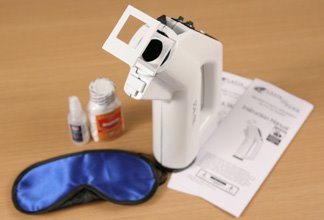
Are you tired of wearing those glasses? Do you think that Lasik surgery is way out of your price range? Well let me introduce you to the Scal-Pal. That's right, for the measely price of $99.95, you too can reap the benefits of expensice Lasik surgery in the privacy and comfort of your home.

The Complete LASIK@Home Kit (patent pending) includes everything you need to complete the procedure.
  • Scal-Pal™ Hand-Operated Combination Femtosecond/Excimer Laser - A real laser!
  • Mild sedative (diazepam 4mg) - I'd pay the $99.95 for the sedative alone.
  • No-Blink™ brand Eye Drops - Don't Blink!!! More on that later.
  • Detailed Instructions and QuickStart Guide - Just four easy steps.
  • Protective Post-Op Sleep Mask - You're going to need a lot of sleep after this.
From what I can tell, these guys are serious. However, you won't find me shooting a laser into my own eye. What if I had an itch? As you can see in the below instructions, which are in cartoon form, even blinking can be disastrous. I like how every page has a footnote that reads "*This statement has not been evaluated by the FDA."


The instructions also show the added benefits of diy Lasik. Apparently, the laser shoots past your eye and into your brain. As it etches information into your gray matter, you will be granted enhanced archery, piloting, romantic and artistic skills.

I think my biggest question is, what do you do with the laser after you're done with your self-surgery. I'll bet you can cut stuff with it. That would be cool. Do you have any ideas?

Correlation: When you are trying to implement a process change without the proper support, DON'T BLINK!!!

*This post has not been evaluated by the FDA.

Thursday, June 22, 2006

Little known Sql String functions

We are all familiar with SQL string functions like LEFT and SUBSTRING. Here are some of the lesser known Sql string functions:

PATINDEX lets you search a string for the first instance that matches a given pattern. The pattern must begin and end with % signs. So the following code selects all the last names in the table that contain the pattern 'ack'.

SELECT LastName FROM tblPersonnel
WHERE PATINDEX('%ack%', LastName) > 0

STUFF inserts a string into another string. It can delete a specified number of characters from the start position before inserting the string. Here is some code that starts at the second letter in the string, deletes the next two characters and then inserts the phrase 'ack'.

SELECT STUFF(LastName, 2, 2, 'ack') FROM tblPersonnel

SOUNDEX and DIFFERENCE can by used to compare how much two strings sound alike. SOUNDEX takes a string and returns a four-character that can be used by DIFFERENCE to determine if two strings sound alike. Here's and example:

SELECT SOUNDEX('Barnett') --> B653
SELECT LastName FROM tblPersonnel
WHERE DIFFERENCE('Barnett', LastName) < 4

Notice that I didn't have to use the SOUNDEX function in the difference parameters.


Here are two where I can't think of a reason to use:
REPLICATE returns a string that is composed by repeating a string for a set number of iterations. Heres a sample:

SELECT REPLICATE('A', 5) --> 'AAAAA'

REVERSE produces a mirrored image of the string. So if you want to return all the names in the table spelled backwards, you could use:

SELECT REVERSE(LastName) FROM tblPersonnel

Like I said, I can't think of any real world examples where those last two would be useful, but they are cool anyway. If you can come up with an example, let me know.

Monday, June 19, 2006

I pwn'd it!

I stumbled across a highly addictive brain teaser from Cambrian House titled PWNIT. It is aimed at coders and technologists and was a lot of fun. It took me about 4 hours, but I got through it all on my own. Oh, and with a little help from the Great Google. I didn't ask the Great Google for the solution, I just looked up reference materials, like the Hebrew alphabet.

When you complete all the puzzles you get to download this graphic to prove that you solved it. Yay me!

I have to give Cambrian House some credit, this is a pretty cool attention grabbing device. I even like their business plan. I guess a bunch of programmer types got sick of their jobs and decided to start their own software company. But wait, they didn't have any idea what software to create. So here is their scheme. They solicit cool and innovative ideas from you, the web audience. You provide them with a great idea and they will make it happen. And if by some chance your idea actually makes some money, they will give you some of the profits. This is brilliant. I think Microsoft should adopt this model as well. I have some great ideas for them and they owe me a refund for all the zeros that they have sold me anyway.

Thursday, June 15, 2006

Rounding in .NET

I was having an issue on at work, where I needed to determine how tall to make a Farpoint Spread row to display some text. I would calculate the size of some text to be entered into a table cell. Then I would take the length of the text, based on the font and divide it by the width of the cell and voila, I should have the number of lines that need to be displayed. However, I was having a problem with some of my tests. About half of the time, I ended up missing a line.

As I looked closer I noticed that all of the variables in my calculation were integers. A ha! .Net was rounding stuff for me, using its default Banker's Rounding system.

If you are unfamiliar with Banker's Rounding, or aren't a banker, then this way of rounding may seem insane to you. Let me explain. In Banker's Rounding everything works just like in regular rounding, except when dealing with halves. So anything less than .5 will always round down and anything greater than .5 will always round up. But when we have exactly .5 then we round to the closest even number. You are probably used to .5 always rounding up. This is a little known, yet extremely important behavior and I hope to have saved you some heartache. Lets see some Bankers Rounding in action:

1.49 ==> 1
1.50 ==> 2
2.50 ==> 2
2.51 ==> 3


Back to my issue. I needed a way to always round up, no matter what the decimal. Enter the Math.Ceiling function. The Math.Ceiling function returns the next whole number greater than the decimal that you started with. Here it is in action:

System.Math.Ceiling(1.0) ==> 1
System.Math.Ceiling(1.3) ==> 2


Alternatively, if you want to always round down, you could use the Math.Floor function. It returns the next lowest whole number from the starting decimal.

System.Math.Floor(2.0) ==> 2
System.Math.Floor(1.9) ==> 1

Thursday, June 08, 2006

Internet Explorer's Progress Bar doesn't stop when the page is finished loading.

I have an asp.net page that is loaded with Farpoint controls and I use Anthem to make callbacks everytime something is changed in any of the cells. So every once and while, I experience an issue where a callback starts up the progress bar. Really, this isn't a problem. The problem is that the progress bar continues to progress slowly, even after the page is complete and ready to use. This gives the users that the page is still doing something and they should wait, a long time, before they start making more edits.

A quick look in google reveiled that the Internet Explorer progress bar was apparently developed by a group of snails, who are not only slow but also of subpar intelligence. At least that's what the community thinks. Google also reveiled this support document. Even Farpoint recognizes this problem and you can read about it here. Here's the gist. When you dynamically insert behaviors in your page, the progress bar gets dazed and confused. If you use the Farpoint spread, you know that this happens a lot. We can set the progress bar back on the right track by writing something to the status bar. I'm guessing that this resets the whole footer in IE.

I am now reseting the status bar on the window.load event and everytime I handle a callback in Anthem. It seems to have corrected my issue.

Monday, June 05, 2006

Reign in the track wheel in IE

I work on a lot of ASPX pages and IE is currently the default browser for the enterprise. I'm sure that you have workied with IE before too. Here's a little quirk that has been especially troublesome for my team and I lately.

Have you ever clicked on a dropdown box, made a selection and then moved the mouse out of the dropdown box and started to scroll the page with your mouse's track wheel? Then you know that in IE the page doesn't scroll, the items in the dropdown do. This can be a real headache since everytime the dropdown list item changes it fires off an event. And God help you if that event is tied to an AJAX callback.

Luckily, there is a way around this. A buddy of mine on the team found this article to explain everything. You just have to handle the 'onmousewheel' event. See the sample:

<select name="mylist" onmousewheel="return(false);">

Note: You don't have to worry about this in FireFox

Friday, June 02, 2006

Cellular Squirrel!


I have received several positive comments about the Badonkadonk post, so I thought I might make a segment out of it. From here on out, every Friday, I will try to bring you yet another demonstration of technology run amuck. And to keep it relevant, I'll draw a correlation of some sort. I have yet to come up with a good name. Maybe my loyal readers will offer some suggestions (this is a blatent attemp to get you to comment on this post). Now onto the good stuff.

Before we get to the finished product, let's take a look at the underlying technology which is really cool. Stefan Marti at the MIT Media Lab has developed an intermediary conversation agent for use with your cellphone. Basically it acts like a call screener. When you get an incoming call the agent picks up the line and interrogates the caller. If the caller is on a whitelist and they don't seem too agitated, then the agent will alert you that you have a call that you want to take. It's like having your own personal secretary. I've always wanted one of those.

Now, let's get creepy. As with all good projects, if you get too intense you run the risk of going insane. Case in point, Apocalypse Now. I think the designers walked right up to the line and boldly crossed it without looking back. Let's listen into the designers as they deal with how to package their new technology.

[Designer One]: We've created a cool technology that will forever change the way we use our cell phones!
[Designer Two]: Brilliant!
[Designer One]: Look I'm getting a call right now. Hello?... Hi Timmy... You did what?... I thought I told you never to play with the beakers... but... alright, I'll clean it up when I get there. <click> Looks like we're going to need another Timmy!
[Designer Two]: Brilliant!
[Designer One]: I know, lets take our new technology and stuff it into an animitronic plush toy fashioned in the image of a cute, cuddly squirrel. Except we'll give the squirrel red, beady eyes and make it shake uncontrollably while we say scary things to Timmy through it.
[Designer Two]: Brilliant!
[Designer One]: HAHAHAHAHA... (Maniacal laughter lasting well into the night.)

And so was born the Cellular Squirrel. Take a look at the pictures, it actually has blood red, beady eyes. There is also a plan for a bunny version.

Todays Correlation: As developers we often take a cool technology and wrap it in a cute and cuddly UI. Maybe I'll give my next UI beady eyes.

Thursday, June 01, 2006

Music and Productivity

Last night our team got together in a war room type setup where we all converged into one room with our laptops to help solve some of our outstanding issues with our current project. One of the guys used his laptop for a jukebox so we would have some background noise. It was a pretty eclectic collection and I enjoyed all of the selections, especially Queensrÿche's Silent Lucidity. Queensrÿche Rules!!! And as much as I like the Beastie Boys, I couldn't help feel more relaxed and focused during songs like Silent Lucidity. So it got me thinking about music's affect on my mood, concentration and productivity.

Can music actually make you more productive or help your concentration? In his article, "Does listening to music improve productivity", Michael Setton shows that it does. He sites a study that showed people who listened to music while they worked actually increased productivity by 10%. Listening to music with an upbeat rhythm can reduce stress hormone levels by as much as 41%. Apparently even cows produce more milk when listening to the right music.

In the spirit of Listibles, I have compiled my top 5 Artist/Albums for increasing my concentration and productivity while I work. They are all What are yours?

Chroma Key - Dead Air For Radios
OSI - OSI
Tool - Aenima
Pink FLoyd - The Delicate Sound of Thunder (I know its a double cd)
Porcupine Tree - Stupid Dream

Wednesday, May 31, 2006

Javascript Debugging Hint

Often times I feel like I have to be a cross between Gil Grisom and Sherlock Holmes when I'm trying to debug a javascript error. So I get very excited when I find a tool or technique to help me. So far my favorite tool is the Venkman javascript debugger, despite rumors that it crashes on some machines.

The other day a co-worker mentioned that enabling the script debugging in Internet Explorer allowed Visual Studio to debug javascript in your site. You can do this by going into IE > Tools > Iternet Options > Advanced and unchecking the "Disable Script Debugging (Internet Explorer)" option. This was very exciting, a way to debug javascript directly in the IDE. It still didn't get rid of those cryptic IE errors, but at least you would break in the IDE. If you want to get better error messages, use Venkman.

Anyway, back to the task at hand. I noticed the other day that Visual Studio's CallStack window works while debugging javascript. Let's perform an exercise to see how useful this could be. Suppose you have a javascript function that is called from several different places. If that function threw an error, the call stack information could help determine what called it. Take a look at this simple page:


<html xmlns="http://www.w3.org/1999/xhtml" >
<head runat="server">
<title>Test Page</title>
<script type="text/javascript">
function runtest1()
{
test(true);
}
function runtest2()
{
test(false);
}
function test(x)
{
if(x == false)
throw("New Error");
}
</script>
</head>
<body>
<form id="form1" runat="server">
<div>
<input type="button"
onclick="javascript:runtest1();runtest2();"
value="Push Me" />
</div>
</form>
</body>
</html>


When you click on the button, runtest1 will execute successfully and runtest2 will throw an error. Now pretend that you don't know exactly where the error was coming from. Take a look at the stack trace and see if you can figure it out.

Tuesday, May 30, 2006

I Love Lists

Everyone loves a list, right? Well, a lot of us do. We watch Letterman because his top ten lists are funny. We go Hanselman's website for his ultimate list of tools. We love to see what other people find important and compare their lists with our own. I find that lists are a great way to find out about tools and sites that I wouldn't have found otherwise.

For the most part, lists are cool. This is why Listible is cool. Listible is kind of like Digg and Del.icio.us got together and had a really cool baby, and named it Listible. Here's how it works. Basically, someone requests that a list be created to cover a topic. Then the public is free to add items to the list and tag them like in del.icio.us. But what makes this site special, is the public's ability to vote for an item thereby driving it up the list. The public sets the relevancy of all the items in the list. So when you view a list, you can be relatively confident that the best stuff is at the top.

You can even vote for the relevancy of the list itself, which will determine how that list ranks compared to other lists. However, I'm a little unclear about this. I can understand one site being a better .NET reference than another site. But, can you really say that a list of .NET reference sites is more important than a list of Wedding Planning sites? It seems to me that importance is in the eye of the beholder.

Thursday, May 25, 2006

IE/Clipboard Security Risk

Have you ever wondered what information a web server can glean from you when you visit a site? You can find out on the Project IP web site. I was really surprised at some of the stuff the site found about my pc and web session. Sure, I expected it to know my IP address, browser version, whether or not cookies were enabled, etc. However, I was surprised to find a list of all the plugins I have installed in my browser and the number of pages that I have viewed in my current web session.

But here's the real kicker, the last text item you copied onto your clipboard! Only works in Internet Explorer on the Windows platform. If you aren't using FireFox by now, maybe this will sway you. It reportedly works with varied success when IE is running in an emulator such as VMWare on another OS. Have you ever copied a password or credit card number or ssn and pasted it into anywhere? Hopefully, it wasn't right before you browsed a site that took advantage of this.

Luckily there is a fix:
Go to Tools > Internet Options > Security > Select a security zone > Custom Level > Scripting > Allow paste operations via script and set it to Disabled or Prompt.

Wednesday, May 24, 2006

Windows Shortcut Keys

I'm always looking for cool keyboard short cuts to help me be more productive in my applications. For example, Visual Studio has a gazillion shortcut keys that enables you to do just about anything without the mouse. I find that while I'm coding, the less time I use switching back and forth between the keyboard and the mouse the more I get done. But what if you aren't in your favorite development environment. Here is a great list of windows shortcut keys from CodingHorror.

If you wish to expand on this list, you might want to try Winkeys. Winkeys allows you to use the Windows key to create keyboard shortcuts for your favorite applications. Here is a list of the ones that I have added. For example, I use Windows + Shift + V to open Visual Studio 2005.

Monday, May 22, 2006

The Orange Movie project has just released their animated short, The Elephant's Dream. The project was sponsored by the Blender Foundation, an opensource community around the Blender 3D modeling, animation and rendering application. The Orange Movie Project's stated goals were to create an outstanding movie short, and to research efficient ways to increase quality of Open Source projects in general.

The short is nothing less than awesome. I've already downloaded it, you can get it and the project files that were used to make it on their web site. It makes me want to try my hand at 3d modeling and animation.

I had to download and install MPlayer to get it to play. MPlayer is currently a console application for Windows. However, there are frontends available for download. Here is one.

Thursday, May 18, 2006

Ba-donk-a-donk!


Now what I'm about to share with you is either a testament to marketing genius or my stupidity. But if loving this stuff is wrong, I don't want to be right. I came across this site by NAO Design, who describe themselves as, and I quote:

"...a multidisciplinary design firm with a focus on automotive design, architecture, pyrotechnics, lighting, furniture, electronics, signage, and web and graphic design, and often the fusion of several such diverse elements."

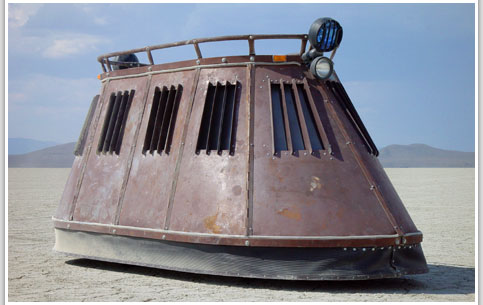
Wow, there's a mouthful. So what makes these guys so special? One word, "Badonkadonk". The Badonkadonk is a personal motorized, armored transport with head/tail lights, turn signals, accent and underbody lights, 400 watt premium sound with PA system, and... Oh yeah, and an optional pyrotechnic system that shoots flames out the top. This product became so popular(how?) that it garnered its own web site. I think the inception went a little like this:

Designer 1: I'll bet I can fit my fist in my mouth.
Designer 2: I'll bet I can sell a go-cart on Amazon for 20 grand.
Designer 1: How the hell are you going to do that?
Designer 2: Easy, I'll just armor plate it and throw in a stereo.
Designer 1: You know what would be cool? If it shot fire.
Designer 2: eh, eh... fire... sweeet.

SideNote: I can't not talk about the PneumatiPak 2, also found on the NAO Design website. Basically a pneumatic powered handheld cannon. So what makes this so much better that your average nail gun that you could pick at Homedepot? I swear I'm not making this up. "With a removable 1.5L liquid reservoir for shooting water, paint, beer, etc. New rotary reloading breech-loader mechanism allows for very rapid reloading of solid ammo, such as hotdogs, marshmallow, batteries, tampons, and carrots. With a maximum range of 100 yards." Priceless... Speechless...

Back to the Badonkadonk and why it inspired this blog. The Badonkadonk is cool, but I don't need all that stuff. Have you every used a piece of software that made you feel the same way? Have you every coded software that made you or the client feel that way? We sometimes have the tendancy to gravitate towards flashy things with lots of cool features that we never use because we don't need them. Gordon Moore recently noted that software has become so complex that it prevents the users from making effective use of the underlying power of their computer. It may be too late for a new years resolution, but the Badonkadonk and my Badonkadonk project, have me picking up and dusting of the old development ethos: "Keep it simple stupid."

Tuesday, May 16, 2006

Cool Atlas information from Jeff Prosise

Yesterday we had a very interesting lunch and learn session on the topic of Atlas. The speaker was Jeff Prosise, co-founder of Wintellect. Jeff was an excellent speaker. I learned a lot in the little time that we had. Here is a breakdown of Jeff's presentation.

1. Introductions
Jeff started out the presentation with a brief overview of Atlas. Atlas is Microsoft's upcoming AJAX framework. It is only compatible with ASP.NET, so you have to serve it from IIS. It is also only compatible with .NET 2.0 and higher. There will be no backwards compatibility with .NET 1.x. I was under the impression that Atlas was a mostly server side technology. However, using the XML scripting language, you can do just about everything on the client side.

2. Ajax support already built into ASP.NET
Jeff demonstrated that there is already support for AJAX built into ASP.NET 2.0. You just have to do a little bit of coding to get it to work. Basically you implement the ICallBackEventHandler interface on your page and then grab a reference to the javascript function that you wish to return to. Here is a page and the code-behind that demonstrates using AJAX in an ASP page.
ASPX:

<html>
<head>
<script language="javascript" type="text/javascript">
function MultiplyByTwo()
{
var tb = document.getElementById("txtNumber");
var value = tb.value;
CallServer(value, "");
}
function DisplayResult(rValue)
{
document.getElementById("lblResult").innerHTML = rValue;
}
</script>
</head>
<body>
<form id="form1" runat="server">
<div>
<input id="txtNumber" type="text"> * 2
<input onclick="MultiplyByTwo();" value="=" type="button">
<asp:label id="lblResult" runat="server">>
</asp:label></div>
</form>
</body>
</html>


Code-behind:
public partial class _Default : System.Web.UI.Page, ICallbackEventHandler
{

protected string returnValue;

protected void Page_Load(object sender, EventArgs e)
{
string cbReference = Page.ClientScript.GetCallbackEventReference(this, "arg", "DisplayResult", "context");
string callbackScript = "function CallServer(arg, context){" + cbReference + ";}";
Page.ClientScript.RegisterClientScriptBlock(this.GetType(), "CallServer", callbackScript, true);
}

#region ICallbackEventHandler Members

public string GetCallbackResult()
{
return returnValue;
}

public void RaiseCallbackEvent(string eventArgument)
{
if (!String.IsNullOrEmpty(eventArgument))
{
int arg = int.Parse(eventArgument);
arg *= 2;
this.returnValue = arg.ToString();
}
}

#endregion
}


3. Framework
When a page containing atlas controls is requested, Atlas sends a copy of its framework down to the client machine. The framework is written completely in javascript. Since most browsers cache javascript, the framework should only be downloaded once, instead of everytime you hit page with an Atlas control. Jeff also mentioned that the release version will contain a browser abstraction layer. This layer will be responsible for making sure your code runs correctly no matter what browser it is displayed in.

4. Clientside Focus
For the clientside, Jeff focused on Atlas' XML scripting language. Most of the examples used very little server side code. The framework parsed the script and generated the necessary javascript to perform the actions. Here is an example of some XML script that displays a panel when you click on a button.

<script type="text/xml-script">
<button id="showButton">
<click>
<setProperty target="panel" property="visible" value="true" />
</click>
</button>
</script>


5. Serverside Focus
For the serverside, Jeff showed off some "Extender" controls. Most noteable the MSN Earth control that hits the same servers as Windows Live Local. There isn't a lot of documentation out there for these, but they seem really cool.

WinFX SDK killed my download

I am extremely keen on XML technologies. I don't claim to be an expert, but I think that they are pretty cool. Recently I have become more and more interested in the prospect of using Flash like technologies to boost the user experience on my web sites. My search led me to XAML. XAML is cool. I haven't actually written anything in XAML, but the demo's on the web are sweet.

What's that you're saying? Why haven't I written anything in XAML yet. I'll tell you why. Because it took almost 4 freak'n hours to get the stuff installed and return my machine to working order, that's why! I don't that kind time. Sure I love watching paint dry as much as the next guy, but seriously! James Robertson has any excellent Squidoo lense for XAML that includes a section on what you need to download and the installation order. Here's a break down of the installation steps and how long it took for each one.

1. WinFX Runtime Components - couple of minutes: This is all you need to view XAML files on your machine. But if your like me, and want to actually write an application you'll need the...

2. WinFX SDK - 3+ hours: Holy creeping downloads Batman! Its a good thing my hard drive had an extra gig of free space. I kid you not, 1.2 gigs. Maybe I should have limited what I wanted to install, but it all looked so delicious. This is why they shouldn't let me eat at buffets. The only thing that I turned off in the install was the 64-bit processor support and Monad (more on that later).

3. Optional Development Tools - 30 minutes: The install took longer than the download.

At this point I am already frustrated with the SDK install, but I made it through and thought that a reboot was in order. You don't have to reboot, I'm just weird. Anyway, I tried to open up a Powershell instance after the reboot and recieved an error. That's odd. Powershell was working before. Wait a minute, where's my powershell install directory?!!! I guess when I told the SDK not to install Monad (because I already had Powershell installed), THE SDK UNISTALLED POWERSHELL!!! I don't even know how. Monad installs under a completely different directory. So that led me to...

4. Microsoft Powershell RC1 - 5-10 minutes: PowerShell rules! Reinstalling sucks!

Alright now its time for a "hello world" application. Wish me luck.

Welcome to my blog

One of my new job "requirements" is to blog to an internal blog. But I thought that some of my more technical and less jobby posts should be shared with the rest of the world. And since I am so cheap, I started this blog for free.

A little about me. I'm an Advanced Software Engineer working with C# and creating mostly web applications. I love xml technologies and am trying to give up the mouse while I'm programming. This is turning out to be very difficult when working on web apps. So expect to see more blogs in those arenas.